Showing posts with label Network Hacking. Show all posts
Showing posts with label Network Hacking. Show all posts
Thursday, 31 January 2013
0
Thursday, 31 January 2013
PRABH KARAN SINGH
Hack a Yahoo Account While Chatting
This is only for education purpose. So try this at your own risk. I am not sure that this will work 100 %. But yes will work almost 70 percent of the times. But before that you need to know some few things of yahoo chat protocol, Following are the features: -
1) When we chat on yahoo every thing goes through the server. Only when we chat thats messages.
2) When we send files yahoo has 2 options.
a) Either it uplo— the file and then the other client has to down load it.
b) Either it connects to the client directly and gets the files.
3) When we use video or audio, It either goes through the server or it has client to client connection and when we have client to client connection the opponents IP is revealed, on the 5051 port. So how do we exploit the Chat user when he gets a direct connection. And how do we go about it. Remeber i am here to hack a system with out using a TOOL only by simple net commands and yahoo chat techniques. Thats what makes a difference between a real hacker and newbies. Its impossible to get a Attackers IP address when you only chat. There are 50% chances of getting a IP address when you send files. Again 50 % chances of getting IP when you use video or audio. So why to wait lets exploit those 50% chances. I will explain only for files here which lies same for Video or audio.
1) Go to Run[win+R], type--> CMD in it. Then in command prompt type ->netstat -n 3
You will get the following output. Just do not care and be cool Active Connections

Just i will explain what the output is in general. In left hand side(Local Address) is your IP address. And in right hand side is the IP address of the foreign machine and the port to which is connected.
2) Try sending a file to the Target. If the files comes from server. Thats the file is uploaded leave it. You will not get the IP. But if a direct connection is established HMMMM then the first attacker first phase is over. This is the output in your netstat. The 5101 number port is where the Attacker is connected.Active Connections
Proto Local Address Foreign Address StateTCP 194.30.209.15:1631 194.30.209.20:5900 ESTABLISHEDTCP 194.30.209.15:2736 216.136.224.214:5050 ESTABLISHEDTCP 194.30.209.15:2750 64.4.13.85:1863 ESTABLISHEDTCP 194.30.209.15:2864 64.4.12.200:1863 ESTABLISHEDTCP 194.30.209.15:5101 194.30.209.14:3290 ESTABLISHED
Thats what is highlighted in RED. So what next3) Hmmm Ok so make a DOS attack nowGo to dos prompt andJust donbtstat -A Attackers IPaddress.Can happen that if system is not protected then you can see the whole network.C:\>nbtstat -A 194.30.209.14
Local Area Connection:Node IpAddress: [194.30.209.15] Scope Id: []
NetBIOS Remote Machine Name Table
Name Type Status———————————————EDP12 UNIQUE RegisteredSHIV GROUP RegisteredSHIV UNIQUE RegisteredSHIVCOMP1 GROUP Registered
MAC Address = 00-C0-W0-D5-EF-9A
Ok so you will ask now what next.No you find what you can do with this network than me explaining everything.
So the conclusion is never exchange files , video or audio till you know that the user with whom you are chatting is not going to harm you
Read more...
Hack a Yahoo Account While Chatting
Hack a Yahoo Account While Chatting
This is only for education purpose. So try this at your own risk. I am not sure that this will work 100 %. But yes will work almost 70 percent of the times. But before that you need to know some few things of yahoo chat protocol, Following are the features: -
1) When we chat on yahoo every thing goes through the server. Only when we chat thats messages.
2) When we send files yahoo has 2 options.
a) Either it uplo— the file and then the other client has to down load it.
b) Either it connects to the client directly and gets the files.
3) When we use video or audio, It either goes through the server or it has client to client connection and when we have client to client connection the opponents IP is revealed, on the 5051 port. So how do we exploit the Chat user when he gets a direct connection. And how do we go about it. Remeber i am here to hack a system with out using a TOOL only by simple net commands and yahoo chat techniques. Thats what makes a difference between a real hacker and newbies. Its impossible to get a Attackers IP address when you only chat. There are 50% chances of getting a IP address when you send files. Again 50 % chances of getting IP when you use video or audio. So why to wait lets exploit those 50% chances. I will explain only for files here which lies same for Video or audio.
1) Go to Run[win+R], type--> CMD in it. Then in command prompt type ->netstat -n 3
You will get the following output. Just do not care and be cool Active Connections

Just i will explain what the output is in general. In left hand side(Local Address) is your IP address. And in right hand side is the IP address of the foreign machine and the port to which is connected.
2) Try sending a file to the Target. If the files comes from server. Thats the file is uploaded leave it. You will not get the IP. But if a direct connection is established HMMMM then the first attacker first phase is over. This is the output in your netstat. The 5101 number port is where the Attacker is connected.Active Connections
Proto Local Address Foreign Address StateTCP 194.30.209.15:1631 194.30.209.20:5900 ESTABLISHEDTCP 194.30.209.15:2736 216.136.224.214:5050 ESTABLISHEDTCP 194.30.209.15:2750 64.4.13.85:1863 ESTABLISHEDTCP 194.30.209.15:2864 64.4.12.200:1863 ESTABLISHEDTCP 194.30.209.15:5101 194.30.209.14:3290 ESTABLISHED
Thats what is highlighted in RED. So what next3) Hmmm Ok so make a DOS attack nowGo to dos prompt andJust donbtstat -A Attackers IPaddress.Can happen that if system is not protected then you can see the whole network.C:\>nbtstat -A 194.30.209.14
Local Area Connection:Node IpAddress: [194.30.209.15] Scope Id: []
NetBIOS Remote Machine Name Table
Name Type Status———————————————EDP12 UNIQUE RegisteredSHIV GROUP RegisteredSHIV UNIQUE RegisteredSHIVCOMP1 GROUP Registered
MAC Address = 00-C0-W0-D5-EF-9A
Ok so you will ask now what next.No you find what you can do with this network than me explaining everything.
So the conclusion is never exchange files , video or audio till you know that the user with whom you are chatting is not going to harm you
Sunday, 21 August 2011
0
Sunday, 21 August 2011
PRABH KARAN SINGH

The word Proxy is derived from a Latin word proximus which means “close”.A proxy is actually a server which helps us maintaining our privacy on the Internet. It is just like a wall between you and the Internet. When you use a proxy, the webpage on the other side won’t be able to see you, webpage interacts with the proxy and proxy in return shows us the webpage. In this way a proxy server works. A client connects to the proxy server, requesting some service, such as a file, connection, web page, or other resource, available from a different server. The proxy server evaluates the request according to its filtering rules.
For example, it may filter traffic by IP address or protocol. If the request is validated by the filter, the proxy provides the resource by connecting to the relevant server and requesting the service on behalf of the client. A proxy server may optionally alter the client’s request or the server’s response, and sometimes it may serve the request without contacting the specified server.
A proxy server can be used for various purposes such as :
Hiding machine or other servers from public. It provides security.
To speed up access to resources (using caching). Web proxies are commonly used to cache web pages from a web server.
To open blocked sites in college schools and some times in offices.
To bypass security/ parental controls.
To protect your real identity on internet.
A proxy server that passes requests and replies unmodified is usually called a gateway or sometimes tunneling proxy.A proxy server can be placed in the user’s local computer or at various points between the user and the destination servers on the Internet.
A reverse proxy is (usually) an Internet-facing proxy used as a front-end to control and protect access to a server on a private network, commonly also performing tasks such as load-balancing, authentication, decryption or caching.
Subscribe us via E-mail and Add us on Facebook for daily updates and Plz also do click once on the ads displaying below or above the post for us.. :)
Read more...
What is a proxy server? When do we need one?
The word Proxy is derived from a Latin word proximus which means “close”.A proxy is actually a server which helps us maintaining our privacy on the Internet. It is just like a wall between you and the Internet. When you use a proxy, the webpage on the other side won’t be able to see you, webpage interacts with the proxy and proxy in return shows us the webpage. In this way a proxy server works. A client connects to the proxy server, requesting some service, such as a file, connection, web page, or other resource, available from a different server. The proxy server evaluates the request according to its filtering rules.
For example, it may filter traffic by IP address or protocol. If the request is validated by the filter, the proxy provides the resource by connecting to the relevant server and requesting the service on behalf of the client. A proxy server may optionally alter the client’s request or the server’s response, and sometimes it may serve the request without contacting the specified server.
A proxy server can be used for various purposes such as :
Hiding machine or other servers from public. It provides security.
To speed up access to resources (using caching). Web proxies are commonly used to cache web pages from a web server.
To open blocked sites in college schools and some times in offices.
To bypass security/ parental controls.
To protect your real identity on internet.
A proxy server that passes requests and replies unmodified is usually called a gateway or sometimes tunneling proxy.A proxy server can be placed in the user’s local computer or at various points between the user and the destination servers on the Internet.
A reverse proxy is (usually) an Internet-facing proxy used as a front-end to control and protect access to a server on a private network, commonly also performing tasks such as load-balancing, authentication, decryption or caching.
Subscribe us via E-mail and Add us on Facebook for daily updates and Plz also do click once on the ads displaying below or above the post for us.. :)
Saturday, 20 August 2011
0
Saturday, 20 August 2011
PRABH KARAN SINGH

Read more...
Hacking internet Web Cam.

Today in this hack i will tell you how you can hack someone's Web Cam and can watch what he/she doing Live. Do this at your own risk and For this you need a very good internet speed.
First go to google search engine and then in the search box type:(without quotes)
“inurl:/view/index.shtml” and press enter
then you will get list on web cameras working on net,,,
Note If u type the ip address of the computer in place of inurl then the web camera of that computer can be hacked.
example:: you can type in google search as
207.111.165.30/view/index.shtml to view webcamera used at that ip address the other google search links which makes web cameras publicly viewable are:
inurl:axis-cgi/mjpg (motion-JPEG)
Subscribe us via E-mail and Add us on Facebook for daily updates and Plz also do click once on the ads displaying below or above the post for us.. :)
Friday, 5 August 2011
0
Friday, 5 August 2011
saurav garg

2.systeminfo
Have a need to display operating system configuration information for a local or remote machine, including service pack levels? Then systeminfo is the tool to use. When I need to connect to a system that I am not familiar with, this is the first tool I run. The output of this command gives me all the info I need including: host name, OS type, version, product ID, install date, boot time and hardware info (processor and memory). Also knowing what hot fixes are installed can be a big help when troubleshooting problems. This tool can be used to connect to a machine remotely using the following syntax: SYSTEMINFO /S system /U user

3. tasklist and taskkill
If you work with Task Manager (ctrl+alt+del) ,you can easily understand this. Task list is list of task which are running on windows currently. If you open any application,it will be added to task.
To List the Tasks type in cmd as : tasklist

To stop the Process or task ,there is two methods : 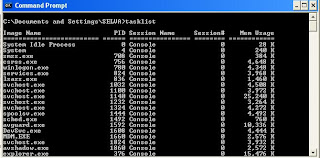
Using Process Id:
we can stop the process using its process id as follows : tasklist /pid 1852

4. type

5.netstat
Need to know who (or what) is making a connection to your computer? Then netstat is the tool you want to run. The output provides valuable information of all connections and listening ports, including the executable used in the connections. In additon to the above info, you can view Ethernet statistics, and resolve connecting host IP Addresses to a fully qualified domain name. I usually run the netstat command using the -a (displays all connection info), -n (sorts in numerical form) and -b (displays executable name) switches.

6.net command
Although this tool is more known as a command, the net command is really like a power drill with different bits and is used to update, fix, or view the network or network settings.


Read more...
10 Commands Use in Networking
In this tutorial i will tell you top 10 important command prompt commands with their usage.
1. ipconfig :
1. ipconfig :
This is the top most command for seeing the ip address,subnet mask and default gateway also includes display and flush DNS cache, re-register the system name in DNS.. This will most useful tool for viewing and troubleshooting TCP/IP problem.
- To view ip ,subnet mask address : ipconfig
- To view all TCP/IP information, use: ipconfig /all
- To view the local DNS cache, use: ipconfig /displaydns
- To delete the contents in the local DNS cache, use: ipconfig /flushdns
2.systeminfo
Have a need to display operating system configuration information for a local or remote machine, including service pack levels? Then systeminfo is the tool to use. When I need to connect to a system that I am not familiar with, this is the first tool I run. The output of this command gives me all the info I need including: host name, OS type, version, product ID, install date, boot time and hardware info (processor and memory). Also knowing what hot fixes are installed can be a big help when troubleshooting problems. This tool can be used to connect to a machine remotely using the following syntax: SYSTEMINFO /S system /U user
3. tasklist and taskkill
If you work with Task Manager (ctrl+alt+del) ,you can easily understand this. Task list is list of task which are running on windows currently. If you open any application,it will be added to task.
To List the Tasks type in cmd as : tasklist
This will show the list of task which are running as shown in the picture
To stop the Process or task ,there is two methods :
Using Image Name:
We can kill the task using its Image Name as follows: tasklist /im notepad.exe
Using Process Id:
we can stop the process using its process id as follows : tasklist /pid 1852
4. type
type is used to read the text document in command prompt .mYou can read multiple text in continuously
type filename.txt
type filename.txt
5.netstat
Need to know who (or what) is making a connection to your computer? Then netstat is the tool you want to run. The output provides valuable information of all connections and listening ports, including the executable used in the connections. In additon to the above info, you can view Ethernet statistics, and resolve connecting host IP Addresses to a fully qualified domain name. I usually run the netstat command using the -a (displays all connection info), -n (sorts in numerical form) and -b (displays executable name) switches.
6.net command
Although this tool is more known as a command, the net command is really like a power drill with different bits and is used to update, fix, or view the network or network settings.
It is mostly used for viewing (only services that are started), stopping and starting services:
- net stop server
- net start server
- net start (display running services)
and for connecting (mapping) and disconnecting with shared network drives:
- net use m: \\myserver\sharename
- net use m: \\myserver\sharename /delete
Other commands used with net command are, accounts (manage user accounts), net print (manage print jobs), and net share (manage shares).
Below are all the options that can be used with the net command.
[ ACCOUNTS | COMPUTER | CONFIG | CONTINUE | FILE | GROUP | HELP |HELPMSG | LOCALGROUP | PAUSE | PRINT | SESSION | SHARE | START |STATISTICS | STOP | TIME | USE | USER | VIEW ]
7 - nslookup -
With the Internet, DNS (Domain Name Service) is the key for allowing us to use friendly names when surfing the web instead of needing to remember IP Addresses. But when there are problems, nslookup can be a valuable tool for testing and troubleshooting DNS servers.
Nslookup can be run in two modes: interactive and noninteractive. Noninteractive mode is useful when only a single piece of data needs to be returned. For example, to resolve google.com:
To use the interactive mode, just type nslookup at the prompt. To see all available options, type help while in interactive mode.
Don't let the help results intimidate you. Nslookup is easy to use. Some of the options I use when troubleshooting are:
set ds (displays detailed debugging information of behind the scenes communication when resolving an host or IP Address).
set domain (sets the default domain to use when resolving, so you don't need to type the fully qualified name each time).
set type (sets the query record type that will be returned, such as A, MX, NS)
server NAME (allows you to point nslookup to use other DNS servers than what is configured on your computer)
To exit out of interactive mode, type exit.
8 - ping and tracert -
8 - ping and tracert -
These tools can be helpful with connectivity to other systems. Ping will test whether a particular host is reachable across an IP network, while tracert (traceroute) is used to determine the route taken by packets across an IP network.
To ping a system just type at the prompt: ping www.google.com. By default, ping will send three ICMP request to the host and listen for ICMP “echo response” replies. Ping also includes switches to control the number of echo requests to send (-n ), and to resolve IP addresses to hostname (-a ).
To use tracert, type at the prompt: tracert www.google.com. You can force tracert to not resolve address to hostnames by using the -d switch, or set the desired timeout (milliseconds) for each reply using -w switch.
9 - gpresult -
Used mostly in environments that implement group poicies, gpresults (Group Policy Results) verifies all policy settings in effect for a specific user or computer. The command is simple to use, just enter gpresults at the prompt. It can also be used to connect to computers remotely using the /S and /U switches.
10 - netsh -
Without a doubt the most powerful command line tool available in Windows. Netsh is like the swiss army knife for configuring and monitoring Windows computers from the command prompt. It capabilities include:
- Configure interfaces
- Configure routing protocols
- Configure filters
- Configure routes
- Configure remote access behavior for Windows-based remote access routers that are running the Routing and Remote Access Server (RRAS) Service
- Display the configuration of a currently running router on any computer
Some examples of what you can do with netsh:
- Enable or disable Windows firewall:
netsh firewall set opmode disable
netsh firewall set opmode disable
- Enable or disable ICMP Echo Request (for pinging) in Windows firewall:
netsh firewall set icmpsetting 8 enable
netsh firewall set icmpsetting 8 disable
- Configure your NIC to automatically obtain an IP address from a DHCP server:
netsh interface ip set address "Local Area Connection" dhcp
(For the above command, if your NIC is named something else, use netsh interface ip show config and replace the name at Local Area Connection).
As you can see netsh can do alot. Instead of re-inventing the wheel, check out the following Microsoft article for more info on netsh.
Subscribe us via E-mail and Add us on Facebook for daily updates and Plz also do click once on the ads displaying below or above the post for us.. :)
Wednesday, 3 August 2011
1
Wednesday, 3 August 2011
saurav garg
Read more...
How To Hack a Computer in a LAN Network
Today,I will write about hacking computer inside the LAN network.
This technique will be taking advantage of Port 139.
Most of the time, Port 139 will be opened.
First of all,I will do a port scanning at the target computer which is 192.168.40.128(this can be any IP in your LAN network). Check your IP address then according to it search for IP related to it.
I will scan it using Nmap Click here to download. After installation in the target box put the IP address which you want to scan and perform the quick scan.
![[Image: 1_13.jpg]](https://lh3.googleusercontent.com/blogger_img_proxy/AEn0k_v4wOPPMl9iol-sVE3-e7HGel_DM0a1zq4-rxIDsSEUiOHN1pZKcVzVjw-s9FKrEQEJLn5OQM3AK4XOCJyscXk4mMhiCgoHKA=s0-d)
I get the result and it shows Port 139 is opened up for me.
Now you will need both of these tools:
** USER2SID & SID2USER
** NetBios Auditing Tool
First of all,I will do a port scanning at the target computer which is 192.168.40.128(this can be any IP in your LAN network). Check your IP address then according to it search for IP related to it.
I will scan it using Nmap Click here to download. After installation in the target box put the IP address which you want to scan and perform the quick scan.
I get the result and it shows Port 139 is opened up for me.
Now you will need both of these tools:
** USER2SID & SID2USER
** NetBios Auditing Tool
Here is the download link for both the softawares
Download Tools.rar
After you get both of them,put them in the C:\ directory.
![[Image: 2_1.jpg]](https://lh3.googleusercontent.com/blogger_img_proxy/AEn0k_vxgARHvbBi7tsYV6JLDpy7XZ3fUs3iRpsgzLQkF1IyOAQS6_bqWTizfPKWcAj_0BayIYWPfl5i88uSD2qdpzMB2OoM0HU=s0-d)
You now need to create a null session to the target computer.
![[Image: 3_3.jpg]](https://lh3.googleusercontent.com/blogger_img_proxy/AEn0k_siB2JDhc4HXSx1zW6tAbkSC-EUj3Z-75oz3RFpG2LLCnSjrkXsTfJrEtNlyqI65alpBuq_xIRPqikSJoLw0Aa_DBCfa_c=s0-d)
Now open the Command Prompt and browse to the USER2SID & SID2USER folder.There will be 2 tools inside it,one will be USER2SID and another one will be SID2USER.
We will first using USER2SID to get the ID.
![[Image: 4_10.jpg]](https://lh3.googleusercontent.com/blogger_img_proxy/AEn0k_vd_Qlf-v-m_kOu3l8n4WWiaqdkILtRMl3UOugNVirpJ4AaEgApuy6Sgkg-j_psuDcqEdzSCA1yht0TYpxZcQKszDIJM9lMeQ=s0-d)
We will test against the Guest account because Guest account is a built in account.
After we get the ID,we need to do some modification on the ID.
We take the ID we get from the guest account and modified it become
"5 21 861567501 1383384898 839522115 500".
Please leave out the S-1-,leave out all the - too.
![[Image: 5_8.jpg]](https://lh3.googleusercontent.com/blogger_img_proxy/AEn0k_tlYwLLZ0Qm49mSePI3D0ZVVoQey4Po_up-SG5TWTtDnCyq_bgXThmY7TyIFSVocrm2qXOw3KdhoEnddXnExtyQ829q4QXV=s0-d)
Now you will see that you get the username of the Administrator account.
In this case,the Administrator account is Administrator.
Create a text file called user.txt and the content will be the username of the Admin account.
![[Image: 6.jpg]](https://lh3.googleusercontent.com/blogger_img_proxy/AEn0k_ukk_NFE8BS1ErIU8Nrps2fWvor4MIGlYlKP3dpk8X7VsYcgIazDvhTYGLzH9lb_I1__UOeYOLc1cP3UWPqisW48dvFBw=s0-d)
Prepare yourself a good wordlist.
![[Image: 7.jpg]](https://lh3.googleusercontent.com/blogger_img_proxy/AEn0k_v35zpaRzf9Z-V44NVKeyywhd9Yp2MvQ5tMiENZda6yqewMS0IdqAq0cfKNv9BZzSbvxYwuy6pXQigBOZBrv8Os31_LTg=s0-d)
Now put both of them in the same directory with the NetBios Auditing Tool.
![[Image: 8.jpg]](https://lh3.googleusercontent.com/blogger_img_proxy/AEn0k_slmERTNmSXlvmLrBwLpyYExC-RnnkSZYjbQY-AVA4gKhNZbMnfxWWSOmXKLjIfk6xTs-fBt_INtX9BDz0ou8dbS8lm=s0-d)
Now we are going to crack the Admin account for the password in order to access to the target computer.
Browse to the NetBios Auditing Tool directory.
![[Image: 9_1.jpg]](https://lh3.googleusercontent.com/blogger_img_proxy/AEn0k_vWaWufkth8C5Ljk7AehnJ7UZ0h8OWMXUcMZdjyhN8ENOHLHLW7eyJQRU-5Ybj_hW_smu3jZJ-bygEcnB5izRPZJuhMlhIx=s0-d)
Press on enter and the tool will run through the passlist.
![[Image: 10.jpg]](https://lh3.googleusercontent.com/blogger_img_proxy/AEn0k_tn3_lC0g4BhawYxAvaELnbtP1qmOZqYVAf_fMI1DzOiBXXBK7JhI_j--PM5cLo2GvioTzIU8XVG0hTgMNiXLjqMdyZkcI=s0-d)
In this case,I have get the password.
In order to proof that I can get access to the target computer using this password.
![[Image: 11.jpg]](https://lh3.googleusercontent.com/blogger_img_proxy/AEn0k_uPfqcP4CGc-IrAIO4_nlyjeXk5bepVItQ_iBizBKTqp9Xv_hRthnotMJp0DOtLhWgQ0A9s1xe_IY8A9_0gXvqqlkyy92U=s0-d)
After you press enter,it will prompt you for the username and password.
![[Image: 12_6.jpg]](https://lh3.googleusercontent.com/blogger_img_proxy/AEn0k_t6iwJjspEgm30AU9y1w685mxV33SD4mathzYi5Sl_Rcssla531J9kwI5ZINtuSvSBtT5h9QQRgeev1gan2GXzEdZeRaO7o=s0-d)
Therefore,just input them inside the prompt and continue.
![[Image: 13.jpg]](https://lh3.googleusercontent.com/blogger_img_proxy/AEn0k_txkQ_qaZz2JA1KAaTzRT6s1YAO1k3GbK2cZdQINBkJSupllySoIG1ATPoN_6wNz1zMn3TZtIpvTMDiKwq7NnK2s9kLcyo=s0-d)
Target C drive will be on your screen.
![[Image: 14.jpg]](https://lh3.googleusercontent.com/blogger_img_proxy/AEn0k_s9fLEwkd0LVyLX4d-iE3pyxtH57jqAGS_e6xwckjqn8g8lO_BsQOBcknF61i00BaahPagWRsVqFLRczcUWSA2YYSn7mjg=s0-d)
In order to prevent from this attack,close down port that you do not want to use such as Port 135,Port 136,Port 137,Port 138 and Port 139.
Subscribe us via E-mail and Add us on Facebook for daily updates and Plz also do click once on the ads displaying below or above the post for us.. :)
Download Tools.rar
After you get both of them,put them in the C:\ directory.
You now need to create a null session to the target computer.
Now open the Command Prompt and browse to the USER2SID & SID2USER folder.There will be 2 tools inside it,one will be USER2SID and another one will be SID2USER.
We will first using USER2SID to get the ID.
We will test against the Guest account because Guest account is a built in account.
After we get the ID,we need to do some modification on the ID.
We take the ID we get from the guest account and modified it become
"5 21 861567501 1383384898 839522115 500".
Please leave out the S-1-,leave out all the - too.
Now you will see that you get the username of the Administrator account.
In this case,the Administrator account is Administrator.
Create a text file called user.txt and the content will be the username of the Admin account.
Prepare yourself a good wordlist.
Now put both of them in the same directory with the NetBios Auditing Tool.
Now we are going to crack the Admin account for the password in order to access to the target computer.
Browse to the NetBios Auditing Tool directory.
Press on enter and the tool will run through the passlist.
In this case,I have get the password.
In order to proof that I can get access to the target computer using this password.
After you press enter,it will prompt you for the username and password.
Therefore,just input them inside the prompt and continue.
Target C drive will be on your screen.
In order to prevent from this attack,close down port that you do not want to use such as Port 135,Port 136,Port 137,Port 138 and Port 139.
Subscribe us via E-mail and Add us on Facebook for daily updates and Plz also do click once on the ads displaying below or above the post for us.. :)
Friday, 29 July 2011
0
Friday, 29 July 2011
saurav garg
Ping
Ping will search the domain name and reveal it. You will often have information on the provider the attacker uses e.g.:
Pinging is normally the first step involved in hacking the target. Ping uses ICMP (Internet Control Messaging Protocol) to determine whether the target host is reachable or not. Ping sends out ICMP Echo packets to the target host, if the target host is alive it would respond back with ICMP Echo reply packets.
All the versions of Windows also contain the ping tool. To ping a remote host follow the procedure below. 
This means that the attacker logged on using “provider.com”. Unfortunately, there are several IP addresses that cannot be converted into domain names. For more parameter that could be used with the ping command, go to DOS prompt and type ping /?.
Ping Sweep

Tracer connects to the computer whose IP has been entered and reveals all stations starting from your Internet connection. Both the IP address as well as the domain name (if available) is displayed. If PING cannot reveal a name, Traceroute will possibly deliver the name of the last or second last station to the attacker, which may enable conclusions concerning the name of the provider used by the attacker and the region from which the attacks are coming.
Port Scanning:-

20 FTP data (File Transfer Protocol)
Besides the above ports they are even some ports known as Trojan ports used by Trojans that allow remote access to that system.
Sniffing

Packet sniffers accept all the packets arrived at the host regardless of its destination IP address. So installing packet sniffer on a system in Ethernet we can monitor all the data packets moving across the network. The data may even include the login names and passwords of the users on the network. Not only that sniffing can also reveal some valuable information about the version numbers of the services running on the host, operating system being used, etc.
HTTP/1.1 301 Moved Permanently
Social Engineering 
Prevention:
1) Don’t believe everyone you meet on the net and tell them every thing about you. Don’t even accidentally say answers to the questions like “What’s you pet’s name?”, “What is your mothermaiden’s name?”, etc. which are particularly used by your web account providers to remind your passwords.
2) Don’t give your credit card details to even your chating through instant messengers. Remember, it’s not a hard deal for an attacker to crack an e-mail id and chat with you like your friend.
Also data through IMs can be easily sniffed.
3) Don’t accept executable files (like *.exe, *.bat, *.vbs, *.scr, etc.) from unknown persons you meet on the net. They might be viruses or Trojans.
Please act carefully, use security software and ask professionals for help.
Subscribe us via E-mail and Add us on Facebook for daily updates and Plz also do click once on the ads displaying below or above the post for us.. :)
Read more...
Network Hacking Tips and Tricks
Common Ways To Attack a Network
Ping
The IP address gives the attacker’s Internet address. The numerical address like 212.214.172.81 does not reveal much. You can use PING to convert the address into a domain name in WINDOWS: The Domain Name Service (DNS) protocol reveals the matching domain name. PING stands for “Packet Internet Groper” and is delivered with practically every Internet compatible system, including all current Windows versions. Make sure you are logged on to the net. Open the DOS shell and enter the following PING command:
Ping –a 123.123.12.1
Ping will search the domain name and reveal it. You will often have information on the provider the attacker uses e.g.:
dialup21982.gateway123.provider.com
Pinging is normally the first step involved in hacking the target. Ping uses ICMP (Internet Control Messaging Protocol) to determine whether the target host is reachable or not. Ping sends out ICMP Echo packets to the target host, if the target host is alive it would respond back with ICMP Echo reply packets.
All the versions of Windows also contain the ping tool. To ping a remote host follow the procedure below.
Click Start and then click Run. Now type ping <ip address or hostname>
(For example: ping yahoo.com)
This means that the attacker logged on using “provider.com”. Unfortunately, there are several IP addresses that cannot be converted into domain names. For more parameter that could be used with the ping command, go to DOS prompt and type ping /?.
Ping Sweep
If you are undetermined about your target and just want a live system, ping sweep is the solution for you. Ping sweep also uses ICMP to scan for live systems in the specified range of IP addresses. Though Ping sweep is similar to ping but reduces the time involved in pinging a range of IP addresses. Nmap (http://www.hackingandtips.blogspot.com) also contains an option to perform ping sweeps.
Tracert:
Tracert is another interesting tool available to find more interesting information about a remote host. Tracert also uses ICMP. Tracert helps you to find out some information about the systems involved in sending data (packets) from source to destination. To perform a tracert follow the procedure below.
Tracer connects to the computer whose IP has been entered and reveals all stations starting from your Internet connection. Both the IP address as well as the domain name (if available) is displayed. If PING cannot reveal a name, Traceroute will possibly deliver the name of the last or second last station to the attacker, which may enable conclusions concerning the name of the provider used by the attacker and the region from which the attacks are coming.
Go to DOS prompt and type tracert <destination address> (For example: tracert yahoo.com). But there are some tools available like Visual Traceroute which help you even to find the geographical location of the routers involved.
Port Scanning:-
After you have determined that your target system is alive the next important step would be to perform a port scan on the target system. There are a wide range of port scanners available for free. But many of them uses outdated techniques for port scanning which could be easily recognized by the network administrator. Personally I like to use Nmap (http://www.insecure.org) which has a wide range of options. You can download the NmapWin and its source code from:
Apart from port scanning Nmap is capable of identifying the Operating system being used, Version numbers of various services running, firewalls being used and a lot more.
Common ports:
Below is a list of some common ports and the respective services running on the ports.
20 FTP data (File Transfer Protocol)
21 FTP (File Transfer Protocol)
22 SSH
23 Telnet
25 SMTP (Simple Mail Transfer Protocol)
53 DNS (Domain Name Service)
68 DHCP (Dynamic host Configuration Protocol)
79 Finger
80 HTTP
110 POP3 (Post Office Protocol, version 3)
137 NetBIOS-ns
138 NetBIOS-dgm
139 NetBIOS
143 IMAP (Internet Message Access Protocol)
161 SNMP (Simple Network Management Protocol)
194 IRC (Internet Relay Chat)
220 IMAP3 (Internet Message Access Protocol 3)
389 LDAP
443 SSL (Secure Socket Layer)
445 SMB (NetBIOS over TCP)
Besides the above ports they are even some ports known as Trojan ports used by Trojans that allow remote access to that system.
Vulnerability Scanning:
Every operating system or the services will have some vulnerabilities due to the programming errors. These vulnerabilities are crucial for a successful hack. Bugtraq is an excellent mailing list discussing the vulnerabilities in the various system. The exploit code writers write exploit codes to exploit these vulnerabilities existing in a system. There are a number of vulnerability scanners available to scan the host for known vulnerabilities. These vulnerability scanners are very important for a network administrator to audit the network security.
Some of such vulnerability scanners include Shadow Security Scanner,Stealth HTTP Scanner, Nessus, etc. Visit http://www.securityfocus.com vulnerabilities and exploit codes of various operating systems. Packet storm security (http://www.packetstormsecurity.com) is also a nice pick.
Sniffing
Data is transmitted over the network in the form of datagrams (packets).These packets contain all the information including the login names,passwords, etc. Ethernet is the most widely used forms of networking computers. In such networks the data packets are sent to all the systems over the network. The packet header contains the destination address for the packet. The host receiving the data packets checks the destination address for the received packet. If the destination address for the packet matches with the hosts IP address the datagram will be accepted else it will be discarded.
Packet sniffers accept all the packets arrived at the host regardless of its destination IP address. So installing packet sniffer on a system in Ethernet we can monitor all the data packets moving across the network. The data may even include the login names and passwords of the users on the network. Not only that sniffing can also reveal some valuable information about the version numbers of the services running on the host, operating system being used, etc.
**NetworkActiv Sniffer is freeware tool available for download click here. The following is the data contained in a packet, captured over my network. (For security reasons I’ve edited the addresses).
HTTP/1.1 301 Moved Permanently
Content-Length: 150
Content-Type: text/html
Location: http://XXX.XXX.XXX.XXX/new/
Server: Microsoft-IIS/6.0
Date: Wed, 12 Mar 200X 08:17:56 GMT
<head><title>Document Moved</title></head>
<body><h1>Object Moved</h1>This document may be found <a
HREF="http://XXX.XXX.XXX.XXX/new/">here</a></body>
From this we can understand that the source system for the packet has a
Microsoft Operating System installed and is running IIS 6.0 (the
operating system might possibly be Windows 2003 Server as it has IIS
6.0 running).
Social Engineering
This has become one of the hottest topics today and it seems to work out most of the times. Social Engineering doesn’t deal with the network security issues, vulnerabilities, exploits, etc. It just deals withsimple
psychological tricks that help to get the information we want. This really works!! But it requires a lot of patience. We are all talking about network security and fixing the vulnerabilities in networks. But what happens if some internal person of a network accidentally gives out the passwords. After all we are all humans; we are also vulnerable and can be easily exploited and compromised than the computers.
Social Engineering attacks have become most common during the chat sessions. With the increase in use of Instant Messengers, any anonymous person may have a chat with another any where in the world. The most crucial part of this attack is to win the trust of the victim.
It may take a long time (may be in minutes, hours, days or months) for this to happen. But after you are being trusted by the victim he will say you every thing about him. Most of the times his person information will be useful to crack his web accounts like e-mail ids, etc. Even some people are so vulnerable to this attack that they even give their credit card numbers to the strangers (social engineers). Some social engineers stepped one more forward and they send some keyloggers or Trojans to the victims claimed to be as screensavers or pics. These keyloggers when executed gets installed and send back information to the attacker. So be careful with such attacks.
Prevention:
1) Don’t believe everyone you meet on the net and tell them every thing about you. Don’t even accidentally say answers to the questions like “What’s you pet’s name?”, “What is your mothermaiden’s name?”, etc. which are particularly used by your web account providers to remind your passwords.
2) Don’t give your credit card details to even your chating through instant messengers. Remember, it’s not a hard deal for an attacker to crack an e-mail id and chat with you like your friend.
Also data through IMs can be easily sniffed.
3) Don’t accept executable files (like *.exe, *.bat, *.vbs, *.scr, etc.) from unknown persons you meet on the net. They might be viruses or Trojans.
Please act carefully, use security software and ask professionals for help.
Subscribe us via E-mail and Add us on Facebook for daily updates and Plz also do click once on the ads displaying below or above the post for us.. :)
Subscribe to:
Posts
(
Atom
)